

Re: WYSIWYG HTML Editor for Miva Merchant 5
You probably recently upgraded to Wombat - the module needs to be updated to the latest version to work there (including the javascripts that come with the module). You can get the latest version from the store of original purchase.
best,
James
-
Re: WYSIWYG HTML Editor for Miva Merchant 5
I already did. Since a rep from the firm is in this forum I thought it would be useful to post here, as well.Leave a comment:
-
Re: WYSIWYG HTML Editor for Miva Merchant 5
You might try opening a support ticket with the developer.Leave a comment:
-
Re: WYSIWYG HTML Editor for Miva Merchant 5
Hi there,
I've used this module for a while and it has been very useful. I was trying to use it today to update some text on one of my product pages. Each time I update/save the page, the text never updates. This has never happened before. How can I fix this?
Thanks,
PatrickLeave a comment:
-
Re: WYSIWYG HTML Editor for Miva Merchant 5
Hey Kayak -
The WYSIWYG editor doesn't have any configurable options as to where it can be used. It's based on the LGPL editor from TinyMCE Editor from http://tinymce.moxiecode.com/ - if there are some strip functions you see there that we don't expose it's something that we could explore adding into the module.
Best,
JamesLeave a comment:
-
Re: WYSIWYG HTML Editor for Miva Merchant 5
James,
Is it possible to 'customize' which fields this can be used on.. rather than on all the ones it does now?
Also,
Is it possible to have a 'stripper' function in this? We have a custom product field for non html short descriptions.. that we want to have any html, ms word, etc. stripped out of.. so it's just plain text. Can your module do this?Leave a comment:
-
Re: WYSIWYG HTML Editor for Miva Merchant 5
Hi James.
So If I connect the dots, this where the module can function:
* Product Description, Header, and Footer
* Category Header and Footer
* ...
Basically any default Miva Merchant text area minus the HEAD and BODY tag, as well as the main page template area.
Would you consider this 'safe' for people who are largely unfamiliar with Miva Merchant and/or HTML?
Is there any way to keep it on by default for certain users?
Thanks,
TimLeave a comment:
-
Re: WYSIWYG HTML Editor for Miva Merchant 5
Excellent, my clients using this module thank you James ;)- added ability to edit page headers, footers, and related contentLeave a comment:
-
Re: WYSIWYG HTML Editor for Miva Merchant 5
Updated to v5.0001:
- added ability to edit page headers, footers, and related content
- excluded ability to edit HEAD and BODY tagLeave a comment:
-
Re: WYSIWYG HTML Editor for Miva Merchant 5
James~
Are there any more screen shots available other than those at eMediaSales and MivaCentral?
Thanks
blaineLeave a comment:
-
WYSIWYG HTML Editor for Miva Merchant 5
WYSIWYG HTML Editor for Miva Merchant 5
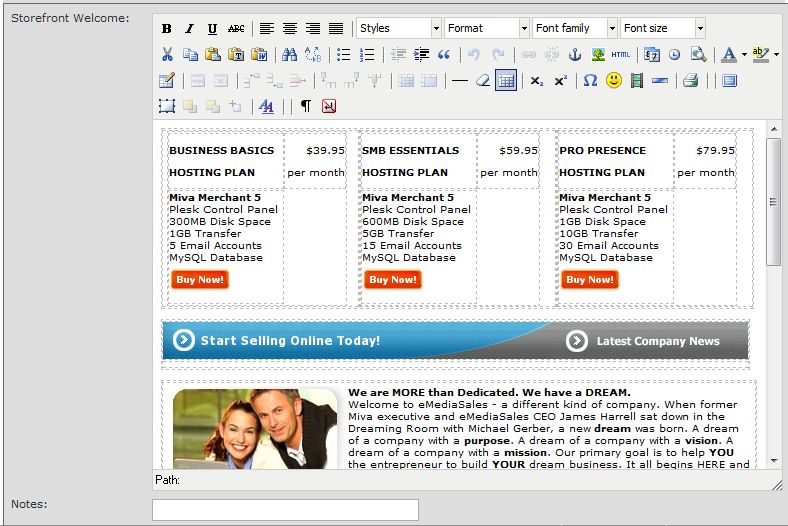
Simplify your life! Add a validating WYSIWYG HTML Editor to Miva Merchant 5. Turns product, category and store "textarea" HTML boxes into HTML Editors with the click of a button! Works with StoreMorph code, items and entities.- Tested with IE7 and Firefox2
- Available at MivaCentral and the eMediaSales Store.
Leave a comment: