Announcement

Collapse
No announcement yet.

Miva Merchant 10.00.x Bug Reports

Collapse
This is a sticky topic.
X
X
 
  • Filter
  • Time
  • Show
Clear All
new posts

  • Eric Foresman
    replied
    Originally posted by SidFeyDesigns View Post
    PayPal Commerce Bug

    Free Shipping Price Group is not being honored using PayPal Smart Buttons after updating the Name, Restrict to Basket Subtotal, and Basket Description fields.

    Price Group Settings:

    Name: Free Shipping $125+ (used to be Free Shipping $100+)
    Eligibility: All Shoppers
    Type: Shipping Discount (Entire Order)

    Method Selection:
    [CHECKED]Reflect Discount in Shipping Method List
    (CHECKED)Do Not Modify Shipping Method Name

    Display in Basket:
    (CHECKED)Modify Applied Charge to Reflect Discount
    (CHECKED)Do Not Modify Description

    Method Discounts:
    100.00 Pecrent (For all ground shipping methods)

    Basket/Qualifying Restrictions
    Restrict to Basket Subtotal: 125.00 - 0.00 (Used to be 100.00 - 0.00)

    Price Group Settings
    Basket Description: Free Shipping on Orders Over $125 (Used to be Free Shipping on Orders Over $100)
    [CHECKED]Display Discount in Basket


    Would recreating the price group from scratch fix this issue for now?

    Currently customers checking out with the PayPal Smart Buttons do not get the Free Shipping if the basket is over $125.

    I would like to fix this ASAP.

    Thanks.
    Hi SidFeyDesigns

    i have reproduced this issue, and have field a bug.

    thanks for the info.

    -Eric

    Leave a comment:


  • SidFeyDesigns
    replied
    PayPal Commerce Bug

    Free Shipping Price Group is not being honored using PayPal Smart Buttons after updating the Name, Restrict to Basket Subtotal, and Basket Description fields.

    Price Group Settings:

    Name: Free Shipping $125+ (used to be Free Shipping $100+)
    Eligibility: All Shoppers
    Type: Shipping Discount (Entire Order)

    Method Selection:
    [CHECKED]Reflect Discount in Shipping Method List
    (CHECKED)Do Not Modify Shipping Method Name

    Display in Basket:
    (CHECKED)Modify Applied Charge to Reflect Discount
    (CHECKED)Do Not Modify Description

    Method Discounts:
    100.00 Pecrent (For all ground shipping methods)

    Basket/Qualifying Restrictions
    Restrict to Basket Subtotal: 125.00 - 0.00 (Used to be 100.00 - 0.00)

    Price Group Settings
    Basket Description: Free Shipping on Orders Over $125 (Used to be Free Shipping on Orders Over $100)
    [CHECKED]Display Discount in Basket


    Would recreating the price group from scratch fix this issue for now?

    Currently customers checking out with the PayPal Smart Buttons do not get the Free Shipping if the basket is over $125.

    I would like to fix this ASAP.

    Thanks.

    Leave a comment:


  • Bruce - PhosphorMedia
    replied
    thanks for reporting. saw that too recently, just too rushed to report.

    Leave a comment:


  • RTHOMASDESIGN
    replied
    The updated MivaPay form has overflow problems on mobile. I think the easiest solution would be to remove the "size" attribute from the input elements (not sure why they're set to 40).
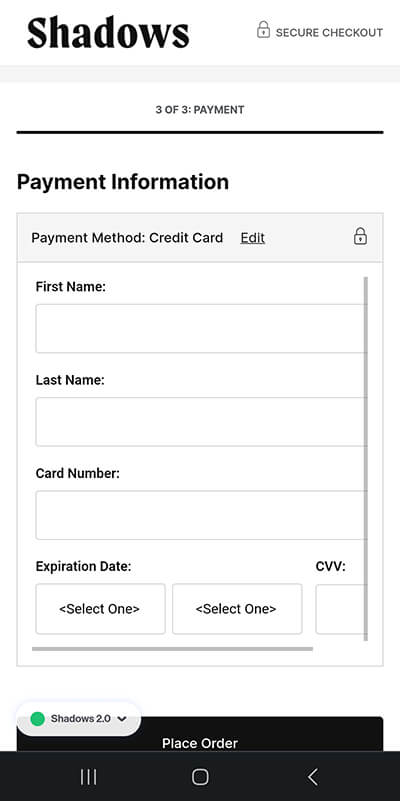


    Also, note that the font-size for the inputs is less than 16px on mobile (in the updated MivaPay CSS)... this causes iPhones to auto-zoom (extremely annoying).

    I've fixed these issues on my end, but thought I'd put this here.

    -Ryan

    Leave a comment:


  • kocourek
    replied
    Thanks Eric. That's my oversight.

    Leave a comment:


  • Eric Foresman
    replied
    Originally posted by kocourek View Post
    It appears that scheduled tasks for the Product Fields and Feeds module do not create log entries. Specifically when the task starts and ends.

    Hi kocourek

    when you created the scheduled task, what logging flags did you set?


    task_logs1.png
    Attached Files

    Leave a comment:


  • kocourek
    replied
    It appears that scheduled tasks for the Product Fields and Feeds module do not create log entries. Specifically when the task starts and ends.

    Leave a comment:


  • delcorsets
    replied
    Eric Foresman The number of products in the list doesn't seem to make any difference. I just pulled up a random category with 177 products assigned. I went to the Sort screen and checked off the first two products to Move to Bottom. Nothing happened...

    Leave a comment:


  • Eric Foresman
    replied
    Originally posted by delcorsets View Post
    Product Sort > Move to Bottom does not seem to be working. I can select a product or group of products and Move to Top or Move to Position, but Move to Bottom is not moving products at all.
    Hi Psydde

    i was not able to reproduce that issue, how many products are in your list?


    Originally posted by SidFeyDesigns View Post

    I noticed this as well and to add to that the "Exit/Close" button is just a blank white square. There is no "X" icon to tell you what the square button does.
    Hi SidFeyDesigns

    we have a bug on this and it is already fixed for 10.05.00

    Thanks

    -Eric

    Leave a comment:


  • SidFeyDesigns
    replied
    Originally posted by delcorsets View Post
    Product Sort > Move to Bottom does not seem to be working. I can select a product or group of products and Move to Top or Move to Position, but Move to Bottom is not moving products at all.
    I noticed this as well and to add to that the "Exit/Close" button is just a blank white square. There is no "X" icon to tell you what the square button does.

    Leave a comment:


  • delcorsets
    replied
    Product Sort > Move to Bottom does not seem to be working. I can select a product or group of products and Move to Top or Move to Position, but Move to Bottom is not moving products at all.

    Leave a comment:


  • SidFeyDesigns
    replied
    PayPal Smart buttons size field does not work.

    Here is what is on the Pay Pal Developer site: https://developer.paypal.com/sdk/js/reference/#style

    Size
    By default, the button adapts to the size of its container element.
    • To customize the button height, set the style.height option to a value from 25 to 55.
    • The width of your button container element must be large enough to fit the payment buttons in your layout. This is necessary for a horizontal button layout.
    The script output on the BASK page has this:

    Code:
    paypal.Buttons( {
    style:
    {
    layout: 'vertical',
    color: 'blue',
    shape: 'rect',
    size: 48,
    label: 'paypal',
    tagline: false
    },
    I believe it should be this.

    Code:
    paypal.Buttons( {
    style:
    {
    layout: 'vertical',
    color: 'blue',
    shape: 'rect',
    height: 48,
    label: 'paypal',
    tagline: false
    },

    Leave a comment:


  • Southlander
    replied
    Shadows Readytheme (browsing on mobile) - There is a login bug on the OINF page, **on just Android** far as I can test/confirm and have others test. When you select "Click here to log in" -- that form. It auto closes when you touch inside (for example) the login ID field to input your login. Thus there is no way to log in at that point in the checkout process. It works normally on iOS and also a desktop browser.
    Screenshot_2022-07-25-04-30-32-63_dc00545bd3b8828f033a02ac25b2d36d.jpg

    Leave a comment:


  • Jim McCormick
    replied
    I've created a ticket in our support system and just emailed you from the ticket so we can collect some more information on this.

    Originally posted by William Davis View Post
    URGENT! - Unable to "301 Redirect to Canonical" legacy URI with illegal character(s) and/or space(s).

    Upon attempting to correct legacy URI with illegal characters and/or space(s), the following message is displayed (screenshot):


    Note: Attempt was made to temporarily disable Admin > Domain Settings > Site Configuration > Use Strict Validation Codes, in order to circumvent error displayed in above screenshot, but was unsuccessful. Thus, "Use Strict Validation Codes" feature was re-enabled.

    Proposed Solution: Permit authorized Admin users to "301 Redirect to Canonical" URIs with illegal characters and/or space(s).

    History: Though store operates on Miva Merchant latest version, it originally had "Use Strict Validation Codes" feature disabled from it's "MM4.24c Open UI" days as a work around in order to permit customers to use their email address ("@" symbol) as their user ID. Since the store has always used product and category codes as part of their URI structure (e.g.: https://www.abc.com/[prod_code].html), any illegal character(s) and/or space(s) used in these "code" fields would subsequently generate comparable URI.

    Ideally, when "Use Strict Validation Codes" feature is enabled, the platform should perform a check for any illegal character(s) and/or space(s) violations prior to permitting the use of said feature and provide an option to generate an error log.

    Example:

    PRODUCT_CODE|CANONICAL_URI

    Leave a comment:


  • William Davis
    replied
    URGENT! - Unable to "301 Redirect to Canonical" legacy URI with illegal character(s) and/or space(s).

    Upon attempting to correct legacy URI with illegal characters and/or space(s), the following message is displayed (screenshot):


    Note: Attempt was made to temporarily disable Admin > Domain Settings > Site Configuration > Use Strict Validation Codes, in order to circumvent error displayed in above screenshot, but was unsuccessful. Thus, "Use Strict Validation Codes" feature was re-enabled.

    Proposed Solution: Permit authorized Admin users to "301 Redirect to Canonical" URIs with illegal characters and/or space(s).

    History: Though store operates on Miva Merchant latest version, it originally had "Use Strict Validation Codes" feature disabled from it's "MM4.24c Open UI" days as a work around in order to permit customers to use their email address ("@" symbol) as their user ID. Since the store has always used product and category codes as part of their URI structure (e.g.: https://www.abc.com/[prod_code].html), any illegal character(s) and/or space(s) used in these "code" fields would subsequently generate comparable URI.

    Ideally, when "Use Strict Validation Codes" feature is enabled, the platform should perform a check for any illegal character(s) and/or space(s) violations prior to permitting the use of said feature and provide an option to generate an error log.

    Example:

    PRODUCT_CODE|CANONICAL_URI

    Leave a comment:

Working...
X