
-
Yeah that is intentional. If you have Miva's Abandoned Basket feature setup, when the scheduled task runs to send the abandoned basket, it will move forward the last updated date/time by 48 hours so that if the customer opens the email and clicks the link the basket still exists.
Miva uses that last updated to determine if the basket is "expired" and if it should be deleted, so by pushing it forward 48 hours it will guarantee the basket will still exist for that time period. Its a configurable value in the abandoned basket email template under Order Fulfillment.Leave a comment:
-
This is pretty low priority, but I noticed today (2/7/2023) that my Review Baskets had a basket from the future (2/9/2023).
Review Baskets 2.7.23.PNGLeave a comment:
-
When adding an item to an order in the admin, the search flyout/autocomplete will not be triggered if the product code is pasted into the code box using the right-click paste operation from a mouse. Using control+V works as expected. I have reproduced this in Chrome and Firefox on Windows 10 & 11.Leave a comment:
-
miva_json_encode creates invalid JSON when given a text value of Infinity
outputsHTML Code:<mvt:assign name="l.settings:test:key" value="'Infinity'" /> <mvt:assign name="l.settings:jsonLine" value="miva_json_encode(l.settings:test, '')" /> <mvt:eval expr="l.settings:jsonLine" />
which is invalidHTML Code:{"key":Infinity}Last edited by new_user2018; 01-26-23, 02:35 PM.Leave a comment:
-
Hi SidFeyDesignsOriginally posted by SidFeyDesigns View Post
i think this is a bug in the paypal module, i dont think deleting and recreating the price group from scratch will have any affect on it.
-Eric
Leave a comment:
-
Eric Foresman not a problem. Would you reccommend deleting and recreating the price group from scratch to fix it for now?Leave a comment:
-
Hi SidFeyDesignsOriginally posted by SidFeyDesigns View Post
i have reproduced this issue, and have field a bug.
thanks for the info.
-EricLeave a comment:
-
PayPal Commerce Bug
Free Shipping Price Group is not being honored using PayPal Smart Buttons after updating the Name, Restrict to Basket Subtotal, and Basket Description fields.
Price Group Settings:
Name: Free Shipping $125+ (used to be Free Shipping $100+)
Eligibility: All Shoppers
Type: Shipping Discount (Entire Order)
Method Selection:
[CHECKED]Reflect Discount in Shipping Method List
(CHECKED)Do Not Modify Shipping Method Name
Display in Basket:
(CHECKED)Modify Applied Charge to Reflect Discount
(CHECKED)Do Not Modify Description
Method Discounts:
100.00 Pecrent (For all ground shipping methods)
Basket/Qualifying Restrictions
Restrict to Basket Subtotal: 125.00 - 0.00 (Used to be 100.00 - 0.00)
Price Group Settings
Basket Description: Free Shipping on Orders Over $125 (Used to be Free Shipping on Orders Over $100)
[CHECKED]Display Discount in Basket
Would recreating the price group from scratch fix this issue for now?
Currently customers checking out with the PayPal Smart Buttons do not get the Free Shipping if the basket is over $125.
I would like to fix this ASAP.
Thanks.Leave a comment:
-
thanks for reporting. saw that too recently, just too rushed to report.Leave a comment:
-
The updated MivaPay form has overflow problems on mobile. I think the easiest solution would be to remove the "size" attribute from the input elements (not sure why they're set to 40).
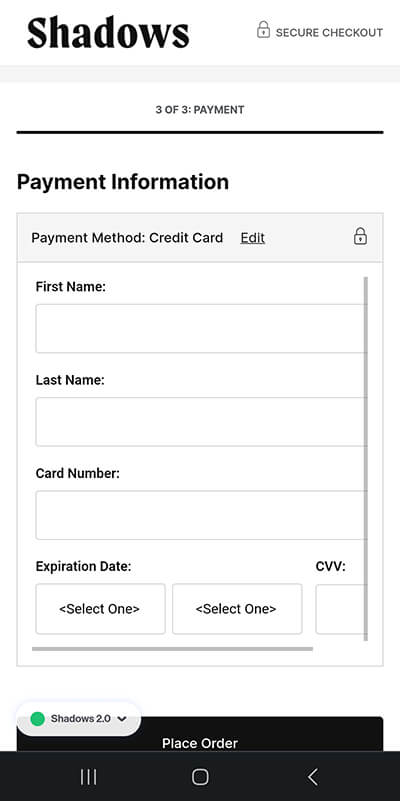
Also, note that the font-size for the inputs is less than 16px on mobile (in the updated MivaPay CSS)... this causes iPhones to auto-zoom (extremely annoying).
I've fixed these issues on my end, but thought I'd put this here.
-Ryan
Leave a comment:
-
Originally posted by kocourek View Post
Hi kocourek
when you created the scheduled task, what logging flags did you set?
task_logs1.pngLeave a comment:
-
It appears that scheduled tasks for the Product Fields and Feeds module do not create log entries. Specifically when the task starts and ends.Leave a comment:
-
Eric Foresman The number of products in the list doesn't seem to make any difference. I just pulled up a random category with 177 products assigned. I went to the Sort screen and checked off the first two products to Move to Bottom. Nothing happened...Leave a comment:


Leave a comment: